Concepts
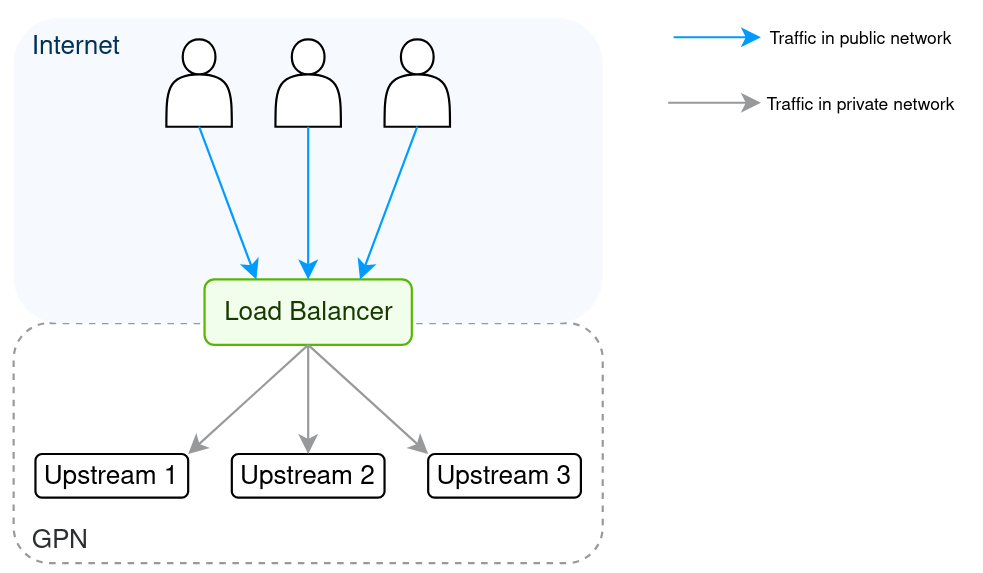
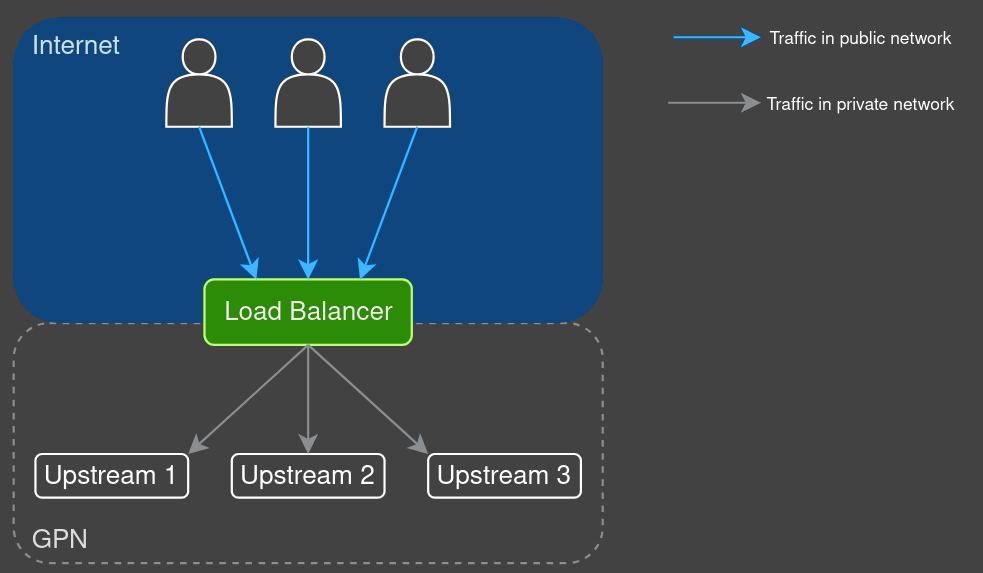
A load balancer is responsible for distributing the workload among upstreams for either dedicated or cloud servers.
Key functions:
- Distributing traffic among upstreams
- Enhancing fault tolerance and redundancy
- Ensuring scalability without system downtime
How it works
| Component | Description |
|---|---|
| Load balancing cluster | A pool of at least three load balancer nodes and switches. There are two types of cluster: Shared cluster – all system resources are shared among multiple accounts or clients. Dedicated cluster – all system resources are allocated exclusively to a single account or client |
| Load balancing node | A pre-configured physical server. Each node, along with pre-configured switches, handles incoming traffic and distributes requests to upstream servers. If a node fails, it is replaced by another using clustering mechanisms. |
| Upstream servers | A pool of cloud or dedicated servers among which the traffic load is distributed. |
| Load balancing instance | A set of load balancing configurations on a node, linked to a specific pool of upstream servers. Each client is allocated an isolated load balancer instance on a node. These instances are individually configured, providing isolated and customizable load balancing within the overall infrastructure. |
| Public IP | Is the entry point for client traffic and is used by all nodes in the cluster. |
The load balancer serves as the entry point for client requests, isolating the upstream server pool from direct client access. The service operates on a complex system of interconnected components. The key components are outlined below.
Key components
The load balancer utilizes BGP (Border Gateway Protocol) and XDP (eXpress Data Path) solutions:
- BGP is a standardized protocol for exchanging routing information between systems
- XDP is a framework for fast packet processing in the Linux kernel
Depending on the cluster, XDP or ECMP (Equal-Cost Multi-Path Routing) may be utilized to optimize traffic routing and enhance performance.
Using the assigned public IP address, the load balancer instance accepts client requests and distributes them among available upstream servers. The distribution is performed based on the health and state of the servers, as well as the distribution algorithms.
Algorithms
A load balancer uses algorithms to determine how requests are distributed among upstream servers.
Our L4 and L7 load balancers use the following algorithms:
- Random least connections. Routes the request to two servers randomly chosen from the entire pool and selects the server with the least number of active connections
- Weighted least connections. Routes requests to the server with the fewest active connections, with the ability to assign priorities to upstream servers based on weight
- Round robin. Distributes requests sequentially in a cyclic order among servers in the pool
Types of load balancing
We offer two types of load balancing based on traffic type, aligned with the OSI model. Both types of load balancers support storing logs in cloud storage that saves information about requests processed by the load balancer into log files in the NGINX format.
L7 load balancer (HTTP/HTTPS)
Works as a reverse proxy server, suitable for working with web applications and APIs that require content-based routing.
Key features:
- Operates at the application layer (layer 7) of the OSI model
- Supports protocols HTTP, HTTPS, and HTTP/2
- Enables uploading and managing SSL certificates for processing HTTPS requests
- Supports SSL termination, handling encryption and decryption of HTTPS traffic
- Verifies the availability of upstream servers using health checks feature with protocols such as HTTP, HTTPS, gRPC, and gRPCS
- Routes traffic based on the content of HTTP/HTTPS requests, including headers, URIs, parameters, and methods (e.g., GET, POST)
- Implements session persistence (sticky sessions) to bind client requests to a specific server for the duration of the session
- Identifies the user's geolocation based on their IP address using the Geo IP feature
The L7 load balancer has the ability to pass the client's real IP address to upstream servers using specific headers in HTTP requests. This allows upstream servers to see the original IP address of the request instead of the load balancer's IP address, which is important for analytics, logging, and access control.
The following options are available in the Customer Portal:
| Setting | Description |
|---|---|
| Disabled | The load balancer does not use headers to pass the real IP address. Upstream servers will see the load balancer's IP address |
| X-Real-IP | The load balancer extracts the real IP address from the X-Real-IP header |
| X-Forwarded-For | The load balancer uses the X-Forwarded-For header, which may contain a list of IP addresses from all intermediate proxies. The real IP address is the first address in the list |
Additionally, the Trusted networks field is available, where you can specify trusted networks in CIDR format (e.g., X.X.X.X/16..32). Real IP addresses will only be accepted from these networks, enhancing security and preventing inaccurate data from unverified sources.
Domain names
At least one domain name must be specified when setting up an L7 load balancer instance. The load balancer only processes requests to the configured domain names. HTTP/HTTPS requests with no matching domain name are dropped and the connection is closed.
SSL termination and forwarding rules
SSL termination relieves application servers of the burden of encrypting and decrypting traffic, with the load balancer handling this instead. Forwarding rules define how traffic is forwarded from the load balancer to upstream servers — each rule maps a scheme, port, and request path on the load balancer side to a scheme, port, and request path on the upstream side. At least one forwarding rule is required.
- Each rule using the HTTPS scheme on the load balancer adds €5.00 per month for the SSL Termination service.
- The "Redirect HTTP to HTTPS" option is available when there is only one HTTPS (443) incoming rule.
Multiple domain names and SSL certificates
You can add multiple domain names to a single load balancer instance. However, only one SSL certificate can be assigned per instance, which will be used for all requests to that instance. To protect multiple domain names with a single certificate, you will need either:
- A wildcard certificate, if all domains are subdomains of the same second-level domain
- An SSL certificate with SAN (Subject Alternative Name) extension, for multiple unrelated domains
If you do not intend to use SAN or wildcard certificates, it is recommended to create separate load balancer instances on a per-domain basis.
Additional HTTP headers
To identify the client IP address, the original host, and the port requested by the client, the load balancer injects the following HTTP header fields into requests sent to upstream servers:
| Header | Description |
|---|---|
X-Forwarded-For | The originating IP address of the client. E.g., 23.108.209.172 |
X-Forwarded-Host | The domain name of the forwarded server. E.g., servers.com |
X-Forwarded-Port | The port of the forwarded server. E.g., 443 |
X-Forwarded-Protocol | The protocol of the forwarded server. E.g., https |
X-SCLB-NodeID | Load balancer node ID. E.g., s1599 |
X-SCLB-RequestID | NGINX Request ID. E.g., bd438656d26a07981169ad4cbf56c0d2 |
Where SCLB stands for "Servers Com Load Balancer".
L4 load balancer (TCP)
L4 load balancers are designed for high-performance systems and applications operating at the TCP level, such as databases, file servers, VoIP, gaming, and more.
Key features:
- Operates at the transport layer (layer 4) of the OSI model
- Balances TCP traffic
- Routes traffic based on IP addresses and ports without inspecting packet content
- Supports proxy protocol, forwarding the client's real IP address to the upstream server. Without this, upstream servers only see the load balancer's IP address
- Verifies the availability of upstream servers using the health checks feature
Health checks
The load balancer regularly checks the status of each upstream server through health checks. It sends these checks at set intervals, using the specified port, protocol, and path. If a health check fails, the upstream is temporarily removed from the pool of available nodes. Once the upstream passes a subsequent health check, it is automatically reinstated into the pool.
The load balancer directs traffic only to healthy upstreams. For L7 instances, the load balancer expects an HTTP 2xx or 3xx response from a functioning upstream server. Each upstream server is checked approximately every 5 seconds.
Geo IP
Geo IP is a load balancer feature that determines the geographic location of a client based on their IP address. It is useful for geographically distributed systems, enabling the following:
- Routing requests based on the client location
- Managing access (allow or restrict) to specific resources based on the client geographic location
- Optimizing the route of requests to reduce latency by directing requests to the nearest servers
For L7 load balancers, the Geo IP service maps the client IP address against the MaxMind GeoIP® database and injects the following header fields into HTTP requests sent to upstream servers:
| Header | Description |
|---|---|
X-SCLB-GEO-CITY-NAME | City name, e.g., "Amsterdam", "Washington" |
X-SCLB-GEO-POSTAL-CODE | Postal code, e.g., 190000 |
X-SCLB-GEO-STATE-NAME | USA state name, e.g., "Texas" |
X-SCLB-GEO-STATE-CODE | USA state code, e.g., "TX" |
X-SCLB-GEO-GPS-LAT | Latitude |
X-SCLB-GEO-GPS-LONG | Longitude |
X-SCLB-GEO-AS-NUM | Autonomous system number |
X-SCLB-GEO-AS-ORG | Autonomous system organization |
X-SCLB-GEO-COUNTRY-CODE | 2-letter country code, e.g., "NL", "US" |
X-SCLB-GEO-COUNTRY-NAME | Country name, e.g., "Netherlands", "United States" |
These headers can be used for content personalization, fraud detection, ad targeting, traffic analysis, compliance, and more.
Access logs
The Logs storing feature allows logging information about requests processed by the load balancer to NGINX-style access log files. Logs are stored in the cloud storage of your Servers.com account in one-minute segments, with new files added in batches of five every five minutes.
Enabling and disabling
Logs storing can be enabled during the creation of a new load balancer instance or toggled on or off in the Load Balancer Details of an existing instance. When enabling, you will be prompted to select a cloud storage region.
Accessing log files
Log files can be accessed via Swift API, FTP, or the Customer Portal. A load-balancer-logs folder is created automatically in the selected cloud storage region, containing a subfolder named after the load balancer's ID.
Segment filename format:
%lb_hashid%_%location_code%_%lb_host_id%.YYYY-MM-DD_HH-MM.gzLog format
TCP (Layer 4):
$msec $remote_addr:$remote_port $protocol [$upstream_addr] [$proxy_protocol_port] [$session_time] $status $bytes_sent $bytes_receivedHTTP/HTTPS (Layer 7):
'$msec $request_id@$xsclbnodeid [$scheme://default:$server_port] $remote_addr:$remote_port '
'[$upstream_addr] [$upstream_status] [$upstream_connect_time] [$upstream_header_time] [$upstream_response_time] '
'$status $request_time "$request" "$http_referer" "$http_user_agent"'
Pricing
The Logs storing option has a fixed monthly price, billed in addition to the fixed fee of the load balancer instance. Cloud storage is billed separately at its regular price.